
Download Wallpaper Engine Free [PC & Android] + GUIDE
Wallpaper Engine is the highest quality software when it comes to putting animated backgrounds on Windows. It is the best option in terms of functionality and customization options and, unlike its main competitor (Lively Wallpaper), it costs 3.99 euros on Steam (which, according to the opinion of many, is quite worth paying if you are going to use it regularly).

How to download Wallpaper Engine for Windows PC & Android.
Wallpaper Engine is available for free on Android, while on Windows it is a paid app that can be purchased and downloaded only from Steam for just €3.99. Therefore, you will need to have a Steam account to be able to purchase and install it correctly. That said, once you have installed it, the software will not require you to be connected to Steam or have it open to work properly.What features does Wallpaper Engine offer?
- It allows you to set animated wallpapers using videos, either from your in-app gallery or directly from your PC.
- It has multiple customization options for backgrounds, allowing us to customize to the maximum variables such as the position of the same or the speed at which the video advances, among many others.
- It has an extensive gallery of backgrounds that have been prepared by other users, where you can explore and select backgrounds to apply directly on your PC from the software.
- It has a free mobile application that allows you to import the backgrounds that we are using on our PC, being able to synchronize all the content of our account easily between the PC and mobile application.
- The backgrounds can be accompanied by sound, which is usually just ambient and adds another layer of customization quite interesting.
- Allows to add Screensavers as well.
Wallpaper Engine - How to set animated backgrounds for PC step by step (Guide)
Putting an animated background using this software is really simple, whether we are selecting one of the available backgrounds in its internal gallery, or using our own backgrounds. First, let's see how to add wallpapers directly from the gallery of available backgrounds inside the application: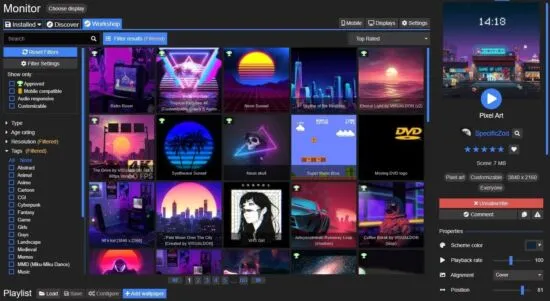
- Download and install Wallpaper Engine using Steam (you can also find it for free online, but given its low cost, it is recommended to simply buy it).
- Once you open Wallpaper Engine, you will see that it comes ready with some pre-installed backgrounds that you can select to try out.
- Go to the "discover" tab or the "Workshops" tab to see all the available options (which are almost infinite), and start choosing the backgrounds you like the most.
- When you want to add a background to your Installed Backgrounds Gallery, simply click on the "Subscribe" button. Once you have done this action, the background will be downloaded and installed directly in your gallery so you can have it at hand whenever you want.
- If you want to fully customize the backgrounds you choose, the software has numerous options just below the Subscribe option, ranging from the position of the background or the background playback speed to the volume of the sound or the color of the theme.
How to create custom animated backgrounds using Wallpaper Engine
If what you want is to add your own animated backgrounds, which you can download from our website, the process to follow is as follows (very simple, by the way):- Go to the bottom area of the software window and click on "Open Wallpaper" > "Create New Wallpaper".
- A pop-up window will open. Click on the "Create Background" button and select the video file you want to place as animated background.
- Click on the "Create Background" button.
- Choose the name you want to give to the background and the theme color that will be applied to the PC.
- Click OK.
- Once this process is finished, the animated background will be ready to be used directly from the installed backgrounds tab.