
Lively Wallpaper for PC
Lively Wallpaper is a software for Windows that allows us to put animated wallpapers on our PC. It is a totally free software that many people use as an alternative to Wallpaper Engine (a paid software with more features).
 Although it may not be the best option, the truth is that Lively Wallpaper includes everything you need to install animated backgrounds on your PC in a simple way. While it is true that Wallpaper Engine offers more customization options, Lively Wallpaper is a more than decent option to make up for this function.
How to download Lively Wallpaper for Windows?
Being an Open Source Software, Lively Wallpaper is completely free, and can be downloaded directly from the Microsoft App Store, or from the creator's website. We leave here both links for you to select the option that most interests you:What's included in Lively Wallpaper for Windows?
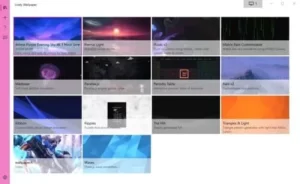
- Simple Software to add Animated Wallpapers to your PC.
- It allows you to import videos in different formats, as well as GIFs.
- It has the option to import an animated background directly from a Youtube video.
How to put an animated wallpaper on Windows using Lively Wallpaper?
The simplicity of use of this application make it extremely easy to put animated backgrounds using it. Here are the steps to follow: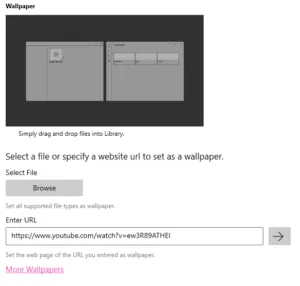
- Download and install Lively Wallpaper.
- Set the basic customization options during the installation.
- Click on the "+" button located on the left sidebar.
- Click on "Browse" and select the video file you want to use as an animated background.
- If you want to add a Youtube video instead of a video from your pc, simply copy and paste the URL of the video in question inside the corresponding field.
- Add a title to your liking to make it more easily recognizable in your gallery.