
How to set animated live wallpapers on Android without applications
Luckily for all Android users, this mobile operating system natively incorporates the option of placing animated wallpapers on the home screen and lock screen. Thanks to this, being able to enjoy a moving background on Android is as simple as having the MP4 video you want to use for this purpose.
How to put animated backgrounds on Android natively
The process to successfully set animated wallpaper on Android is as follows: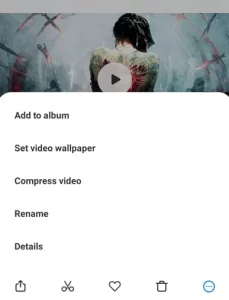
- Select any video from the web and download it. You can also use any MP4 video that you have in your gallery.
- Once in your gallery, open the video as if you were going to watch it.
- Click on the three dots at the bottom right, and select "Set video background"
- .
- Once you have done this, you will see a preview of what the animated background will look like. If you are satisfied with the result, click "Apply."
- Finally, choose whether you want to set the video as the lock screen background or the home screen background.
- Now, you just need to browse our website to find the best Animated Backgrounds for Android.